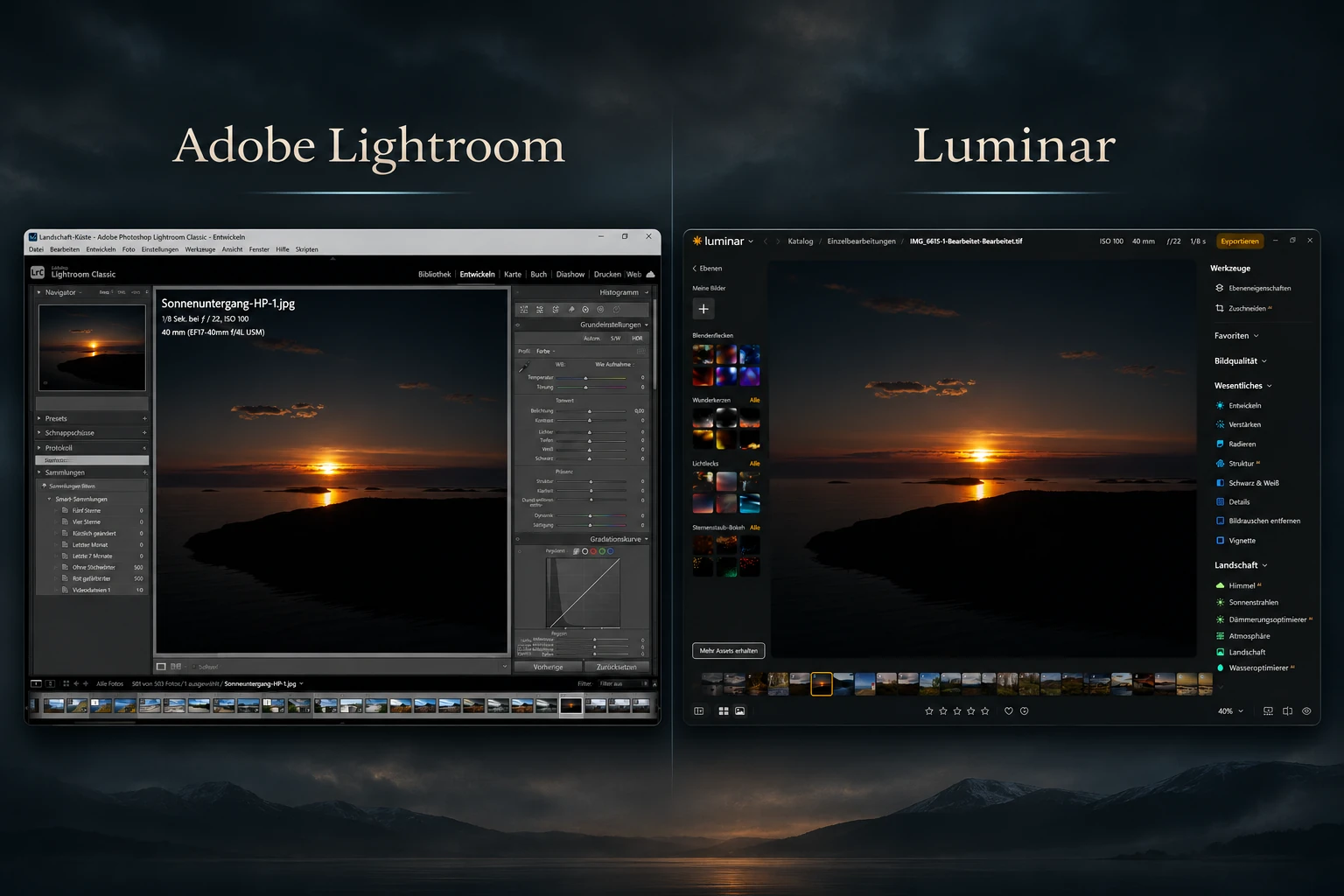
Lightroom vs Luminar 2026. Two photo editors, plenty of possibilities, and a familiar question: which one do I actually need? Anyone who knows my photographs can probably guess where my sympathies lie. I love Lightroom. Adobe’s monthly invoice, on the other hand, will never make my list of favourite subjects.
For me, editing starts with a question: what made me stop and take the photograph? A narrow beam of light in the forest? One bright detail surrounded by darkness? I want to bring that moment out of the image. I want to decide where the light falls and how much darkness should remain. That is why I enjoy working with Lightroom Classic. But dismissing Luminar as a toy for quick effects would be lazy. The software has moved on.
This article compares the current features, editing workflows and costs of Lightroom Classic and Luminar, formerly Luminar Neo. My preference is obvious, and I make no attempt to hide it. Where I have not carried out a controlled test under identical conditions, I will not invent a winner. A handful of sliders and a sunset do not turn a blog into a scientific laboratory.
Comparison date: 2 November 2026. Both companies update their software frequently. Prices, packages and individual features may change.
Lightroom or Luminar: The main differences at a glance
| Area | Adobe Lightroom Classic | Luminar |
|---|---|---|
| Workflow | Extensive RAW development and a catalogue | Traditional photo editing with a wide range of AI-assisted tools |
| Local adjustments | Precise masks, gradients and selection tools | Masks, layers and automatic subject detection |
| Photo management | Catalogues, keywords, ratings and metadata | Catalogue and photo organisation |
| Creative effects | Detailed manual control with AI-assisted options | Tools for sky, atmosphere and relighting, among others |
| Licence | Subscription | Perpetual licence available; some services have time limits |
This is a guide, not a points contest. Both applications can develop RAW files, make targeted corrections and create striking photographs. The main difference is often how you reach the result.
What changed in Lightroom and Luminar during 2026?
Adobe continues to develop Lightroom Classic, not only its cloud-focused Lightroom app. Its latest documented release is version 15.6 from September 2026. Recent improvements include more precise mask edge and feathering controls, easier selection of landscape and people masks, and cleaner reflection removal on glass and water. Anyone who thinks Lightroom is simply manual editing from another era has missed a few updates.
Skylum also redesigned Luminar’s interface in 2026, bringing the catalogue, presets and editing closer together. The current application is called Luminar, although the older name Luminar Neo is still widely used. The autumn update released on 28 October (version 1.29.0) brought smarter crop suggestions, revised Atmosphere tools and printing features with ICC profiles and soft proofing. Those are interesting additions for fine art photographers. I have not tested whether they suit my own images better than my established Lightroom workflow, though. Comparing today’s Luminar with an interface from several years ago would hardly be fair.
Adobe: Lightroom Classic release notes (external link) · Skylum: What is new in Luminar (external link)
RAW editing: What matters in my landscape photography?
When I open a RAW file, my goal is not to move as many sliders as possible. I look for a balance: detail in the highlights, depth in the shadows, believable colour, and most importantly a mood I recognise. In Lightroom Classic I work with exposure, the tone curve, white balance and local masks. Small adjustments can make an enormous difference.
That sounds less exciting than a perfect sky in one click. At least I understand why the photograph looks the way it does. This is especially important in my dark forest images. Sometimes the background should almost disappear while a fern or a single line remains in the light. Lightroom gives me the kind of control I have learned to trust.
Luminar offers traditional adjustments for tone, colour and detail too. It also includes tools such as Enhance AI, Relight AI, Sky AI and Atmosphere AI. That creates a different route into editing. The program can suggest changes and simplify particular steps. If that brings someone closer to the image they imagined, it is a genuine advantage. Working efficiently is not a crime against photography.
AI and masking: Lightroom has plenty to offer as well
The simple story that Lightroom is all manual while Luminar does everything with AI is no longer true in 2026. Lightroom Classic offers automated subject and landscape selections, masking, noise reduction and tools for removing distracting objects. Recent releases have improved masking in particular.
Luminar puts AI assistance more visibly at the centre of many tools. It can replace skies, introduce atmospheric effects, identify areas for masking and combine elements through layers. It also offers manual adjustments. Claiming that Luminar is nothing more than one-click editing would be nonsense.
For me, the more interesting question concerns photographic intention. If I stand in a foggy forest in the morning, I want to photograph that fog. Later I may strengthen it, darken it or bring some areas back in Lightroom. Generating entirely new fog is another kind of visual creation. It can be appealing. It just is not automatically what I am looking for.
I have no objection to AI tools. I use helpful technology where it supports the development of a photograph. I am simply not very interested in software telling me what the sky should have looked like.
Photo management: Finding an old image matters too
Lightroom Classic has a particularly important place in my workflow because of its catalogue. I can sort photographs, rate them, assign keywords and find them again years later. After many photo tours and ongoing series, that is not a minor detail. Anyone who has tried to locate a particular frame from last autumn will understand.
Luminar has a catalogue and organisational tools as well. Lightroom Classic, however, is designed specifically for a substantial desktop workflow with catalogues, local drives and extensive metadata. When planning to build a photo archive over many years, that deserves attention. The real question is whether your system will still make sense in five years, not which sidebar looks nicer today.
Lightroom vs Luminar: Prices and licences in November 2026
My main complaint about Lightroom is easy to identify: the subscription. At the start of November 2026, Adobe’s German Photography plan is advertised at 23.79 euros per month on an annual plan billed monthly. It includes Lightroom Classic, Lightroom, Photoshop and 1 TB of cloud storage, among other things. Other Lightroom plans are available, and prices vary by country, taxes and promotions.
Luminar offers perpetual licences. That sounds attractive, particularly to anyone who shares my limited enthusiasm for subscriptions. Still, the details matter. Current Skylum offers include access to certain generative features, such as GenErase, GenSwap and GenExpand, as well as other services, for an initial 365 days. Continuing to use those services afterwards may require a paid Luminar Prime subscription. Some future major upgrades may also involve additional payments, depending on the package.
A perpetual licence means you can continue using the software you purchased. It does not necessarily mean every new online service and future feature is free for life. That small distinction rarely appears in the largest type.
Check the current terms before buying: Adobe Photography plans (external link) · Luminar licences and terms (external link).
Who is each photo editor for?
- Lightroom Classic: Photographers who manage large RAW archives, want detailed control over edits and plan to maintain an organised library for years.
- Luminar: Photographers who want to explore ideas quickly, make use of AI tools and may prefer a perpetual licence over a conventional monthly subscription.
- Both together: Luminar can work as a plug-in for Lightroom Classic. You can keep Lightroom’s catalogue and add Luminar tools for selected tasks.
Can Luminar replace Lightroom?
For some photographers, yes. If you mainly develop individual images, enjoy creative tools and do not need an extensive Lightroom archive, Luminar may be a good fit. If you have already built your entire workflow around Lightroom Classic, a switch deserves careful thought. It is about more than whether a single photograph looks good. It is also about how you handle thousands of images.
Which program produces better image quality?
A universal winner cannot be established from feature lists. That would require the same RAW files, a controlled editing process and reproducible comparisons. The two interfaces in my featured image show the same sunset scene in Lightroom and Luminar. They illustrate the applications; they are not a standardised RAW image-quality test. Anyone claiming to measure image quality from two screenshots has probably mistaken the white balance slider for a weather forecast.
My verdict: I am staying with Lightroom
I love Lightroom, and this comparison does not change that. I enjoy the quiet process of developing an image. Adding a mask to a dark forest, gently directing the light, then pulling a bright patch back into shadow. Sometimes that takes longer. For me, that is part of photography.
Luminar has genuine strengths: plenty of creative tools, a direct route to AI-assisted editing and a licence model that may suit some photographers better. Anyone who enjoys making images with Luminar does not need permission from Lightroom users.
For my kind of landscape and fine-art photography, Lightroom Classic remains my first choice. I want to bring my own vision to the image. The software can help, but I prefer to make the decisions. I will look at Luminar again as the programs evolve. Perhaps it will surprise me someday. Until then, I am opening Lightroom. I will ignore the invoice for a moment.
Frequently asked questions about Lightroom and Luminar
Is Luminar the same as Luminar Neo?
The name Luminar Neo is still widely used. In 2026 Skylum calls its current desktop application Luminar and has redesigned its interface. Searches for Luminar Neo versus Lightroom generally refer to this same software comparison.
Does Lightroom Classic have AI features?
Yes. Lightroom Classic includes AI-assisted selection and masking, noise reduction and tools for removing certain distracting elements. Available functions also depend on the version installed.
Do I have to pay every month for Luminar?
No. Skylum sells perpetual licences. However, some generative AI services and future upgrades can require additional payment once their included access period ends. Read the terms of your particular package.
Can I use Luminar with Lightroom Classic?
Yes. Skylum also offers Luminar as a plug-in for Lightroom Classic. The two can be combined if you prefer to keep your existing Lightroom catalogue.
More about the way I edit photographs
If you want to see how I think about light and image mood, my article on the Orton effect gives a fairly direct opinion on a popular editing style. If the Adobe subscription is your main concern, I have also written about it in Lightroom free in 2026: The truth about the subscription.
One response to “Lightroom vs. Luminar 2026: Welches Programm passt zu deiner Fotografie?”
-
Moin Dirk,
ich wollte gerade den Rechner herunterfahren, da lese ich das!
Jetzt stehe ich hier in meinem Arbeitszimmer, fühle mich direkt angesprochen, den Finger nachdenklich an der Lippe und eigentlich wollte ich doch gerade an die Nordsee.
Das Thema ist wirklich spannend, zumal ich selbst mit beiden Programmen arbeite. Dazu werde ich mich auf jeden Fall noch einmal bei dir melden. Ich hätte nämlich einiges dazu zu erzählen und würde gerne meine Erfahrungen mit dir teilen.
Aber jetzt zieht es mich erst einmal nach draußen.
Also, mein Freund, ich wünsche dir einen schönen Tag, gutes Licht und immer eine angenehme Zeit!
Liebe Grüße
Michael

Leave a Reply